September 17, 2007
I kind of suspected it, but there you go:

PS: I’m really glad that my awkwardness score is not asĀ high as my science/math/technology/computer/history score
September 10, 2007
I’m a shareware author and that implies a lot of email-related routine. Since I hate routine tasks, I’ve been looking at ways to streamline my emails workflow lately. Here is what I mean by routine tasks. Each shareware author sells his software over the Internet via one of the online sales providers (Regnow, RegSoft, Plimus, ShareIt, etc.). Whenever somebody purchases your software you receive an email with order details – product purchased, number of copies, total, GST/VAT, user name, address, etc. Your regular routine is:
- Check email
- Copy user name from email into Clipboard
- Run Code generation utility
- Paste user name and number of licenses into the code generation utility
- Click Generate code button
- Copy generated code into Clipboard
- Create an email based on a template for particular product
- Enter user name into the email
- Paste generated code
- Press Send button
The most important bit is that you have to be physically present in front of your computer in order to perform the above mentioned 10 steps. What if you want to store the user details in the database or check customer’s email against previous orders to offer a discount? More routine!
As a software developer I can write my own email processor. While it’s an option, I see it as a waste of time. Then Biztalk, perhaps? It’s nice and easy for a programmer, BUT with Standard Edition’s price of US$8,500 it’s not really an option for many people. Here is the alternative – Advanced Email Parser (AEP).
Why? First of all its cost. It starts at US$400, 1/20th of Biztalk’s price. Enterprise license costs double that (AU$999 + GST in Australia). Compare that with the cost of BizTalk Server 2006. Secondly, AEP is quite simple to use, user doesn’t require programming skills to create simple solutions. However, you may require a skilled programmer in case of complex business processes integration (various back-end systems, databases, web services, etc).
Here is how I can fix the above mentioned problem of processing an online order for my shareware program Quick To-Do Pro with AEP. (more…)
September 5, 2007
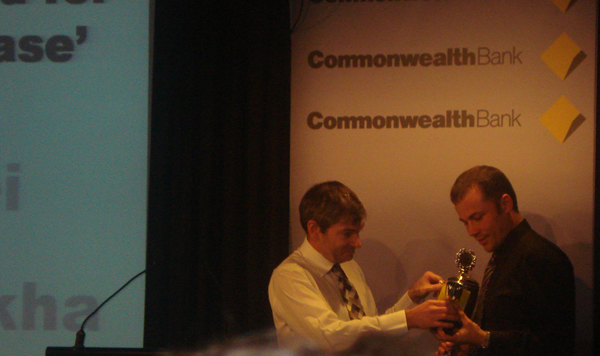
I haven’t been blogging in August, but I can’t say I’ve been on holidays. Quite contrary. It’s been quite stressful during last couple of months. Stressful, but rewarding in the end:

Picture quality isn’t great as it was an unexpected surprise and it was a coincidence that one of my team members had a camera on him. Thanks, Jaffer!
Here is what it looks like on my desk:

August 1, 2007
Pre-compilation of ASP.Net web sites gives some nice benefits out of the box. For example,
- Faster response time for users, since pages and code files do not have to be compiled the first time they are requested. This is particularly useful on large sites that are updated frequently.
- A means to identify compile-time bugs before users see a site.
- The ability to create a compiled version of the site that can be deployed to a production server without source code.
Let’s discuss these points.
- It’s a nice feature to have but there are other tools to hit every page of the web site as after deployment which will achieve the same result. Moreover, web site testing tools like Selenium can do the same job as well as verify the functionality according to pre-defined tests.
- If you’re using a tool like Selenium, this is covered. Also, nothing is stopping you from integrating pre-compilation into your build process for the sake of checking for errors, but deploy the original version if required. And integrating Selenium or any other similar tool into your build process will do a much better job.
- This is only required if you deploying to a client and want to keep your intellectual property protected. It doesn’t apply to a lot of cases.
By now you probably sense my antagonism towards pre-compilation. Why? Because of the deployment restrictions it creates with regards to hot fixes. Even if you pre-compile for deployment and update, this is what can be done with the .ASPX files:
You can change the layout of .aspx files and add elements that do not require code, such as HTML elements and ASP.NET server controls without event handlers. You can also add new .aspx files, which will be compiled normally on first request.
Which basically mean that you can hot fix a typo in HTML mark up, but that’s about it. No code changes at all!!! Consider this before you implement it in a corporate environment, where every change requires authorisation and deploying the new version of the entire pre-compiled web site is not an option outside of scheduled release process.
July 24, 2007
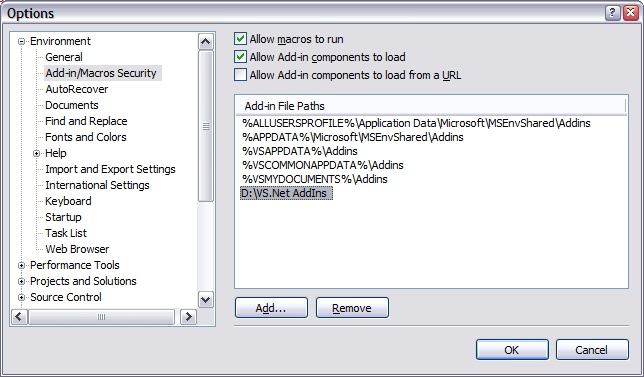
I’ve been setting up my machine for a new project and part of this set up was VMware Workstation installation (VMware-workstation-4.5.2-8848.exe). After the installation I realised that I had VMware Player installed previously and it looked like an unnecessary waste of space on my nearly full drive C: (don’t ask me why our corporate standard don’t provide enough space on drive C:) There is goes – uninstall. It appears that some crucial parts of VMware Workstation set up were removed during the uninstallation of VMware Player and as a result VMware Workstation stopped working.
Sounds trivial? However, VMware installation programs are not fun.
Repair installation failed because it failed to find parts of installation which it was about to delete (!!!!!!!). Uninstall didn’t work for the very same reason and new install didn’t work because existing version was still there. Catch-22. Deadlock!
After a numerous attempts to fix it without re-imaging my hard drive, I found THE SOLUTION – Microsoft Install Cleanup utility. It removed all the broken registry entries and let me run a brand new install of VMware workstation that worked like a charm. God bless Microsoft!
July 22, 2007
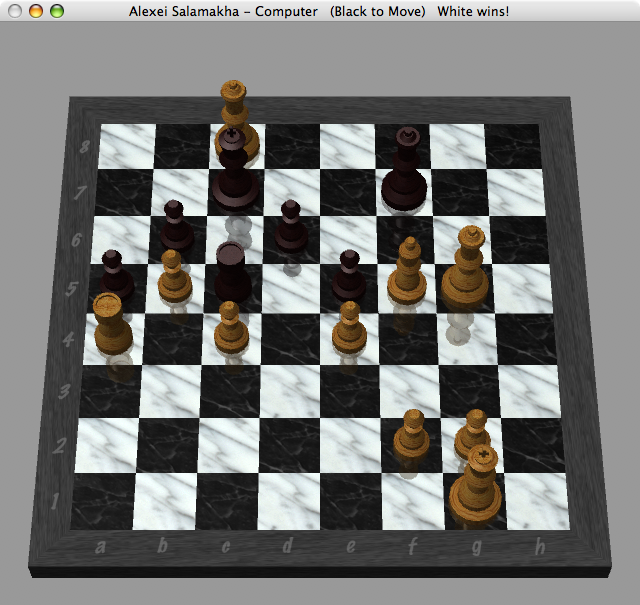
I’m a Windows boy, so when I got my Macbook Pro I had to study basics – how to install and uninstall programs, configure network, create new users, etc. Really basic stuff, you know; It kinda made me feel stupid . So when I had my first chance to relax a bit by playing a game of chess under OS X against my Macbook Pro, it was nice to win, just to show this computer who is the master

It was a good attacking game as you can see from the screenshot. I guess I have to play a bit more regularly, chess is a great fun!
Now that I mentioned my Dopod d810, I decided it’d be great to share few things about software I use and recommend to any user of a smartphone under Windows Mobile 6.
- Spb Mobile Shell. It’s a surprisingly good piece of software that changes your screen totally. I really like Now screen that pops up every time I switch the phone on. It gives an instant view of what’s on.
- Spb GPRS Monitor. My phone supports HSDPA, I get really fast Internet connection on it, so I can easily get carried away with browsing and, potentially, downloading more than my provider’s 500MB per month limit. This little app does exactly what I need – it shows usage stats and warns me if my usage approaches the limit or goes over it.
- TomTom Navigator. This app saved us a number of times during our latest trip to Europe. Now with GPS built-in, it’s a definite install.
- Skype. My provider offers 1000 minutes of fre Skype-to-Skype calls per month. Why not call for free?
- eWallet. Smartphones are great because you can carry lots of information with you. However, some of that information is commercially sensitive or private and I can’t risk loosing it if I loose my phone. eWallet helps me keep my private info on the phone due to its 256-bit RC4 encryption. It also syncs with its desktop version, so I keep two copies of the info and can easily recover from loss of one copy.
- Total Commander. I use Windows version of Total Commander for over 10 years, so it’s natural for me to use its Windows Mobile version. It has a number of advantages over standard File Explorer. For example, FTP client, registry editor, Zip/UnZip, etc. It’s free too.
- CHM eBookReader. Allows reading eBooks in CHM (Windows Help file format). CHM is the best format for eBooks and this app makes it even better.
- HAALI Reader. Some books are available in plain Text format. HAALI Reader is the best and free app for reading this kind of books. Check Project Gutenberg site for some 1700 free books.
These apps will cover pretty much everything. If you have any other apps worth mentioning, please share with me.
With my beloved HP rw6828 being sent back to HP for refund, I started to look around for its replacement. The choice is obvious: Dopod d810 is pretty much the best phone on the market. It has every single feature you may need – 3G, HSDPA, Bluetooth 2.0, Wi-Fi, built-in GPS, easy buttons navigation, scroll wheel and it has constant attention from Dopod. Recently Windows Mobile 6.0 have been released for Dopod d810.

Battery lasts for about 2-3-4 days, depending on usage. I read e-books on mine, as well as browse Internet a bit,use Google Reader actively use to-do list and contacts, make calls over Skype, use TomTom and Google Maps for directions, etc. I’m yet to try video calls, can’t comments on this feature.
However, there are few things to complain about. GPS sensitivity isn’t great comparing to my Bluetooth GPS BT-338. Also its shiny black case is a fingerprint magnet.
But overall it’s a very, very, very good phone that covers all needs of an IT professional or any busy person with lots of contacts. Highly recommended!
July 20, 2007
I’ve got a Macbook Pro few days ago and installed Vista on it. The install under BootCamp was a breeze – I’ve burned a CD with drivers for Vista, then installed Vista and then installed drivers’ CD, auto-run, reboot, all working. Not a single glitch! Even Apple remote works!
As far as performance is concerned, Macbook Pro is a pretty good performer. Mine is 15.4″ 2.2 GHz,128 MB Video, 2GB RAM, 160GB hard drive with a glossy screen. Its overall Vista score is 4.8, which is pretty good, I reckon:

Overall thoughts on Macbook Pro:
I’ve spent a great deal of time reading up on the Internet about it and had a number of concerns. Lots of people said they overheat, that their screens are not that good, that one-button touchpads are very uneasy to use for Windows users, it’s fans are noisy under Vista, that keyboard layout is weird, etc. It all false from my point of view.
My Macbook Pro doesn’t generate significant heat, it’s one of the quietest laptops I’ve seen and used in my life, single-button touchpads are great with two-finger clicks (actually, I think it’s a better way of navigating because it’s much easier to put a second finger on a touchpad and use thumb to click that to move your thumb towards right touchpad button in regular laptops) and the screen is pretty good, on par with Sony Vaio screens.
The only “weak” point of Macbook Pro from Windows guy’s point of view is its keyboard – it’s slightly off comparing to a regular Windows keyboard. However, BootCamp does a good job of mapping most of the keys accordingly with the exception of right Enter key (what’s the use of it? ). It’s also weird to make screenshots with Fn+F11 and press Fn+Delete for Del. I can potentially map right Enter as a Del key, but couldn’t be bothered, really. I got used to it within first couple of days and that’s says a lot because I’m very particular about my keyboards.
Would I recommend Macbook Pro to a Windows programmer like myself? ABSOLUTELY! It’s a fine machine, good build quality, nice design, great performance, very easy to set up both OS X (literally 5 minutes) and Windows Vista. You can run it as a dual boot machine and get the best of both worlds.
July 15, 2007
Recently I had a task to return rows from a SQL Server database in random order.
Here is a simple solution:
SELECT * FROM MyTable ORDER BY newid()
Potential applications include selecting a random tip of the day or a random product of the day for any portal/online shop/etc, which is now simple enough by typing the following:
SELECT TOP 1 * FROM MyTable ORDER BY newid()
« Previous Page — Next Page »
|
|